Routing: Dynamic Routes | Next.js

Dynamic Routes can be used to programmatically generate route segments from dynamic data.

nextjs.org


App route 설정하기


- 우선 Next 프레임워크를 설치해준다.

npx create-next-app@latest


- 대부분 설정을 'yes' 하고 진행하였다.


- [폴더명] 안에 파일

  -page.js 화면을 구성

  -layout.js 화면을 감싸는 레이아웃


- Next에선, app> [폴더명] > page.js 로 구성해주면 ,
해당 경로로 라우터가 생성된다. 


ex )  example.com/[폴더명]


동적 라우트 설정

- dogs/[slug]/page.js

import Image from "next/image";

async function getData(slug: string) {
  const res = await fetch(`https://dog.ceo/api/breed/${slug}/images`);

  if (!res.ok) {
    throw new Error("Failed to fetch data");
  }
  return res.json();
}

export default async function Page({ params }: { params: { slug: string } }) {
  const data = await getData(params.slug);
  
//품종에 따른 강아지 사진들을 가져와서 사진을 띄운다.
  return (
    <main className="flex min-h-screen flex-col items-center justify-between p-24">
      <h1>{params.slug}</h1>

      <div className="grid grid-cols-2 md:grid-cols-4 gap-4">
        {data.message.slice(0, 25).map((imgurl: string) => (
          <Image
            className="rounded-lg transition-transform duration-500 hover:border-2 hover:border-black"
            key={imgurl}
            src={imgurl}
            width={500}
            height={500}
            layout="responsive"
            objectFit="cover"
            alt="Picture of the dog"
            placeholder="blur"
            blurDataURL="data:image/png;base64,iVBORw0KGgoAAAANSUhEUgAAAAEAAAABCAQAAAC1HAwCAAAAC0lEQVR42mPMqAcAAVUA6UpAAT4AAAAASUVORK5CYII="
          />
        ))}
      </div>
    </main>
  );
}


- 경로 폴더 명은 [slug] 로 지정해주면   example/dog/[임의의 값]

- 하위 페이지에 params로 임의의 값이 매개변수로 전달된다.


* placeholder='blur' 과 blurDataURL 에 크기가 작은 base64 이미지를 적용시키면,

이미지를 불러올때, placeHolder를 적용시켜준다.


https://png-pixel.com/


Transparent PNG Pixel Base64 Encoded

Embed PNG pixels directly in your source code If you don't like having small 1x1 pixel images in your projects, you can embed the base64 encoded pixel directly in your css or html source files. CSS background-image: url(data:image/png;base64,); HTML <img s

png-pixel.com


https://nextjs.org/docs/app/api-reference/components/image#blurdataurl


Components: <Image> | Next.js

Optimize Images in your Next.js Application using the built-in `next/image` Component.

nextjs.org


Next Image


import Image from 'next/image'


- Next 내장 컴포넌트 <Image>를 사용해줬다.


- Next Image 장점

  • 크기 최적화
  • 시각적 안정성
  • 빠른 페이지 로딩


AWS 아마존 웹 서비스는 전 세계적으로 가장 많이 쓰이는 클라우드 컴퓨팅을 제공해준다.


그 중 Amazon EC2로 나만의 작은 컴퓨터를 대여 받아서 사이트를 구동 시켜보자.


신규 가입을 하면 프리티어(Free tier)를 부여받고, 1년 간 aws 다양한 서비스를 무료로 이용 가능하다.


이 중에서 EC2를 이용한다.


인스턴스 생성


1) EC2 검색 후 클릭


2) 


3) 이름 정하기


4) OS 를 선택 (프리 티어 가능으로 선택해야 무료 버전이다.)

 (하지만, 램 1기가 성능의 안타까운 성능의 컴퓨터를 대여 받게된다..)


5) 해당 컴퓨터를 접속하려면 키 페어를 발급받고, 
그 키를 통해 접속해야 한다. 

(안전한 위치에 생성하고, 선택 해준다.)


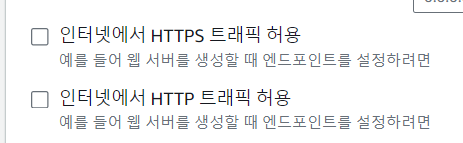
6) http, https 포트 접속 허용을 미리 해줄 수 있다. (차후, 보안 그룹 설정에서도 더 세부적 설정 가능)


7) 나만의 인스턴스(가상 컴퓨터)가 생성된다.


가상 컴퓨터 접속하기


1) 인스턴스 시작 -> 연결 -> ssh 클라이언트로 가준다.


2) 키 읽기 권한 허용 해주기(윈도우) or  (mac :  chmod 400 "키 (pem)" )

- 윈도우에서는 chmod가 없기에 해당 명령어로 허용시켜준다.

icacls.exe [해당 키(pem)] /reset

icacls.exe [해당 키(pem)] /grant:r %username%:(R)

icacls.exe [해당 키(pem)] /inheritance:r


3) 권한 변경 후, cmd창에서 

해당 키가 위치하는 경로로 가서 접속 명령어 입력


4) 접속 완료하면 ubuntu 로 변경된다.


(나머지, npm, node 설치, nginx설정, git clone 관련은 

인터넷에 자료가 충분하기에 생략..)


ts 파일을 PM2 이용해  백그라운드 환경에서 실행 중 오류

PM2: 백그라운드 관리 툴 라이브러리

( 열어둔 서버를 우분투 접속을 끊으면 사이트 구동이 멈춰진다.

계속 실행하려면, pm2를 사용해야한다.)


문제점)

클론해서 받아온 내 ts형식 server파일을


pm2를 js 환경에서만 기본적으로 구동되기에,

.ts로 모두 만들어놔서 애를 먹었다.


해결)

찾아서 시도 해봐도 되질 않기에, 서버 파일들만 (ts-> js)로 다시 바꿔줬다. 


도메인 설정 및 탄력적 IP 설정


우선 탄력적 IP 주소를 지정하는 이유는, 해당 인스턴스를 중지하면

연결할 주소가 바뀌기 때문에, 탄력적 IP 주소를 생성 후 적용시킨다.


이런식의 퍼블릭 IP 주소를 매번 치고 들어갈 순 없다.

사이트만의 특색있는 도메인이 필요하다.


AWS Route 53 호스팅 영역 생성 ->  해당 

가비아로 도메인 구입 후 현 사이트의 라우팅 영역들을


가비아 사이트에서 도메인 구입 후 해당 도메인에 적용 시켜준다.


sudo로 슈퍼 관리자 권한 부여 후 명령어 실행


가끔 권한 설정 안하고 명령어를 치면 오류가 뜬다.

sudo를 붙이도록 하자.


낮은 성능의 인스턴스로 구동시 발생되는 문제


문제점)

성능 이슈로 npm build  빌드 과정에서 멈춤 오류가 떴다...


해결)

컴퓨터에서 build를 하고, build 폴더 포함 push하고

우분투 환경에서 git clone 또는 git pull 해줘서 해결해줬다.


nginx의 역할


nginx?

웹 서버 소프트웨어로, 가벼움과 높은 성능을 목표로 한다. 웹 서버, 리버스 프록시 및 메일 프록시 기능을 가진다.


경로) /etc/nginx/nginx.conf   =>  

server {
    listen 80;
    server_name lets-chat.store;

    location / {
        proxy_pass http://127.0.0.1:5000;
        proxy_set_header Host $host;
        proxy_set_header X-Real-IP $remote_addr;
        proxy_set_header X-Forwarded-For $proxy_add_x_forwarded_for;
        proxy_set_header X-Forwarded-Proto $scheme;

        # WebSocket 연결을 위한 설정
        proxy_http_version 1.1;
        proxy_set_header Upgrade $http_upgrade;
        proxy_set_header Connection "upgrade";
    }
}


- 80포트인 http로 해당 도메인을 접속하면 들어오는 모든 요청을 5000번 포트로 프록시 하는 설정이다.


- app.use~ : 인스턴스에서 server.js를 실행하면, Express 미들웨어를 사용하여 build폴더 안의 정적파일을 제공한다.

app.use(express.static(path.join(__dirname, "../client/build")));

app.get("*", (req, res) => {
  res.sendFile(path.join(__dirname, "../client/build/index.html"));
});


- app.get~: 클라이언트에서 요청한 모든 경로에 대해 클라이언트의 HTML파일을 반환한다.


출처)

https://bitkunst.tistory.com/entry/AWS-EC2-%EB%B0%B0%ED%8F%AC-4-PM2-Nginx-%EC%84%A4%EC%A0%95%ED%95%98%EA%B8%B0


Socket.IO는 실시간 웹 애플리케이션을 위한 이벤트 기반 라이브러리이다. 웹 클라이언트와 서버 간의 실시간 양방향 통신을 가능케 한다. 


https://socket.io/


Socket.IO

Reliable Rest assured! In case the WebSocket connection is not possible, it will fall back to HTTP long-polling. And if the connection is lost, the client will automatically try to reconnect.

socket.io


MongoDB를 이용해, 로그인 시, 대화 목록을 가져옴.

socket io로 실시간 대화 송수신.


socket io- Server


3000포트(클라이언트)와의 CORS(Cross-Origin Resource Sharing)를 막기 위해 설정해준다.

// server/socket.ts

import { Server } from "socket.io";
import http from "http";
import express from "express";

const app = express();

const server = http.createServer(app);
const io = new Server(server, {
  cors: {
    origin: ["http://localhost:3000"],
    methods: ["GET", "POST"],
  },
});


온라인 유저 목록 송신- server


- io.on: 서버와 클라이언트에서 사용되는 수신용 이벤트리스너이다.

// server/socket.ts
io.on("connection", (socket) => {
  console.log("a user connected", socket.id); // 출력) a user connected ihbfG-so_-acDN7SAAAB

- 클라이언트와 연결되면, 클라이언트의 소켓 아이디를 출력한다.


- 소켓에 연결된 유저 목록을 클라이언트로 넘겨주는 작업

interface UserSocketMap {
  [key: string]: string;
}

const userSocketMap: UserSocketMap = {}; // {userId: socketId}
 const userId: string = socket.handshake.query.userId as string;
  if (userId !== "undefined") userSocketMap[userId] = socket.id;

// 유저 _id 배열을 넘겨준다.
  io.emit("getOnlineUsers", Object.keys(userSocketMap));


- userSocketMap(object)에 저장된 값


온라인 유저 목록 수신: client

- 클라이언트에서 이벤트 리스너로 서버로부터 유저 _id 배열을 받아서

현재 접속 중인 유저 목록을 Context API로 전역적으로 저장하고 관리한다.

  useEffect(() => {
    if (authUser) {
      const socket = io("http://localhost:5000", {
        query: {
          userId: authUser._id,
        },
      });

      setSocket(socket);

      socket.on("getOnlineUsers", (users) => {
        setOnlineUsers(users);
      });


온라인 상태인 유저


- Context API를 사용하는 이유: 

보통 애플리케이션 UI 랜더링 데이터로는 전역 상태 관리로는 Redux, Recoil, zustand... 등이 있지만,

Context API는 소켓과 같은 인스턴스 및 함수를 저장하는데 적합하다.


메시지 송신- client


메시지 보내기


클라이언트) 

	try {
			const res = await fetch(`/api/messages/send/${selectedConversation._id}`, {
				method: "POST",
				headers: {
					"Content-Type": "application/json",
				},
				body: JSON.stringify({ message }),
			});
			const data = await res.json();


메시지 수신- server


발신자와 수신자 ID 저장)

 const { message } = req.body;
        const { id: receiverId } = req.params;

        const senderId = req.body.user._id;


발신자와 수신자 사이에 기존 대화를 찾기)

- 대화가 존재하지 않으면 발신자와 수신자를 참가자로 하는 새로운 대화를 생성한다.

let conversation = await Conversation.findOne({ participants: { $all: [senderId, receiverId] }, });

if (!conversation) { ... }:

   ** $all 연산자: 배열 필드가 주어진 모든 값을 포함하는 문서를 찾는데 사용 ** 


새 메시지를 생성)

- 새 메시지가 성공적으로 생성되면, 그 메시지의 ID를 대화의 메시지에 추가한다.

const newMessage = new Message({ senderId, receiverId, message, });

if (newMessage) { ... }


대화와 새 메시지를 데이터베이스에 저장)

- Promise.all은 해당 작업을 병렬로 수행하여 성능을 향상시킵니다.

await Promise.all([conversation.save(), newMessage.save()]);


수신자의 소켓 ID를 검색) 

수신자의 소켓 ID가 발견되면, 새 메시지와 함께 수신자의 소켓에 newMessage 이벤트를 전송합니다.

수신자의 클라이언트는 새 메시지로 즉시 업데이트.

const receiverSocketId = getReceiverSocketId(receiverId);

if (receiverSocketId) { ... }


실시간 메시지 송-수신- client


server)

if (receiverSocketId) {
            io.to(receiverSocketId).emit("newMessage", newMessage);
        }


client)

 useEffect(() => {
        socket?.on("newMessage", (newMessage: any) => {
            newMessage.shouldShake = true;
            const sound = new Audio(notificationSound);
            sound.play();
            dispatch(setMessages([...messages, newMessage]))
        });

        return () => socket?.off("newMessage");
    }, [socket, setMessages, messages]);
};


'IT > Backend' 카테고리의 다른 글

[BE] JWT 로그인 환경 구축  (0) 2024.02.03


JWT(Json Web Token) 방식으로 로그인 구축 해봤다. (MERN)


장점: 

  • 토큰을 클라이언트 쪽에 저장하여서 서버쪽에서는 Stateless하다. 서버의 부하를 줄일 수 있다.
  • OAuth에 경우, 구글, 페이스북 등 소셜 계정을 이용하여 로그인 할 수 있는 확장성이 있다.

단점:

  • 클라이언트에 저장되므로, XSS(크로스 사이트 스크립팅)공격에 취약하다.
  • 한 번 발급되면 만료 시간까지 무효화 할 수 없어서, 토큰이 탈취 당하면 곤란할 수 있다.
    (예방: 토큰 만료기간을 짧게 가져간다.)


JWT 구조

- .(점) 을 기준으로 3 부분으로 나뉘어있다.

  • 헤더, Payload, 1,2로 생성된 해쉬된 서명키가 세번째 문자열이다.


const token = jwt.sign(
      { name: user.name, id: user._id },
      process.env.JWTKEY!,
      { expiresIn: "1h" }
    );


- 두 번째에 해당하는 값을 추정 당하지 않게 자기만 알 수 있는 값으로 설정하고.

- 안전하게 환경변수(dotenv) 로 사용해주었다.


node 서버


//server.ts
dotenv.config();
const PORT = process.env.PORT || 5000;

const app = express();
app.use(cors());
const server = createServer(app);

// body 데이터를 json형식으로 사용:
//json 형태의 데이터를 해석- body-parser 기능 포함
app.use(express.json());
// x-www-form-urlencoded 형태 데이터 해석
app.use(express.urlencoded({ extended: false }));

const MONGO_KEY = process.env.MONGO_URI!;
mongoose
  .connect(MONGO_KEY)
  .then(() => console.log("MongoDB connected !!"))
  .catch((err) => console.log("mogo error", err));

app.use("/api/auth", AuthRoute);

server.listen(PORT, () => {
  console.log(`listening on *:${PORT}`);
});


Mongo DB에 저장된 회원 확인 (인증, Authentication)


📦server
 ┣ 📂controllers
 ┃ ┗ 📜AuthController.ts
 ┣ 📂middleware
 ┃ ┗ 📜authMiddleware.ts
 ┣ 📂models
 ┃ ┗ 📜userModel.ts


- (회원가입)  mongo DB에 회원 정보 저장 (name: string, password: string)

  -여기서 password는 "bcrypt" 라이브러리로 암호화된 패스워드로 변경해주었다.

// AuthController.ts

export const registerUser = async (req: Request, res: Response) => {
  const salt = await bcrypt.genSalt(10);
  const hashedPass = await bcrypt.hash(req.body.password, salt);
  req.body.password = hashedPass;


- 해당 name으로된 회원이 있으면 에러 반환

const newUser = new User(req.body);
  const { name } = req.body;

  try {
    const oldUser = await User.findOne({ name: name });
    console.log(oldUser);
    if (oldUser) return res.status(400).json({ error: "User already exists" });

    const user = await newUser.save();
 
    return res.status(200).json({ user, message: "User created successfully" });
  } catch (error: any) {
    const error_msg = error as mongoose.Error;
    return res.status(500).json({ message: error_msg });
  }
};


- (로그인)

- mongoDB에서 해당 name으로 된 유저를 찾고, 입력한 패스워드와
디코드한 DB상의 패스워드를 비교해 일치하지 않으면 에러 반환

export const loginUser = async (req: Request, res: Response) => {
  const { name, password } = req.body;

  try {
    const user = await User.findOne({ name: name });

    if (user) {
      const validity = await bcrypt.compare(password, user.password);

      if (!validity) {
        return res.status(400).json({ error: "wrong password" });
      }


- 일치하면 토큰을 생성하고, 클라이언트로 헤더와 바디 중 HTTP 응답 헤더에 토큰을 담아서 반환 시킨다.

- 이렇게, 반환하면 헤더 본문을 오염시키지 않는다는 장점이 있다.

else {
        const newToken = jwt.sign(
          { name: user.name, id: user._id },
          process.env.JWTKEY!,
          { expiresIn: "1h" }
        );
        const refreshToken = jwt.sign(
          { name: user.name, id: user._id },
          process.env.REFRESH_JWTKEY!,
          { expiresIn: "7d" }
        );
        res.setHeader("x-auth-token", newToken);
        res.setHeader("x-refresh-token", refreshToken);
        return res
          .status(200)
          .json({ success: "Login success", user: { name: user.name } });
      }


(인가, Authorization)

- 사용자가 회원이여야만 가능한 작업들 사이에 인증 토큰을 확인 받고,
사용자가 맞으면 인가를 받고 그 작업을 수행할 수 있는 상태로 만든다.


  • 로그인에 성공하면, localstorage에 토큰을 저장한다.
  • 그 토큰을 axios 헤더에 넣어서, 서버와 통신을 할 때 마다 인가를 받을 수 있게 만든다.
// authSlice.ts
if (token) {
  axios.defaults.headers.common["Authorization"] = `Bearer ${token}`;
} else {
  delete axios.defaults.headers.common["Authorization"];
}


- headers.authorization 토큰을 이용해 해당 유저 정보를 찾는다.

// authMiddleware.ts

// protect 미들웨어
const protect = expressAsyncHandler(
  async (req: Request, res: Response, next: NextFunction) => {
    let token;

    if (
      req.headers.authorization &&
      req.headers.authorization.startsWith("Bearer")
    ) {
      try {
        // Get token from header
        token = req.headers.authorization.split(" ")[1];

        // Verify token
        const decoded = jwt.verify(token, process.env.JWTKEY!);

        // Get user from the token
        req.body = await User.findById(
          (decoded as jwt.JwtPayload).id as jwt.JwtPayload
        );

        next();
      } catch (error) {
        console.log(error);
        res.status(401).json({ error: "Not authorized, token failed" });
      }
    }


-req.body 결과값:


- 만약, 토큰이 만료됐다면, refreshtoken으로 새로운 토큰을 생성해준다.

 else {
      // Check for refresh token

      const refreshToken = localStorage.getItem("refreshToken");
      if (refreshToken) {
        try {
          // Verify refresh token
          const decoded = jwt.verify(refreshToken, process.env.REFRESH_JWTKEY!);

          // Get user from the refresh token
          req.body = await User.findById(
            (decoded as jwt.JwtPayload).id as jwt.JwtPayload
          );

          next();
        } catch (error) {
          console.log(error);
          res
            .status(401)
            .json({ error: "Not authorized, refresh token failed" });
        }
      } else {
        res.status(401).json({ error: "Not authorized, no token" });
      }
    }
  }
);


export default protect;


토큰 실사용: 계정 삭제

// AuthRoute.ts

import protect from "../middleware/authMiddleware";
router.post("/delete", protect, deleteUser);


- 유저 삭제와 같은 인가가 필요한 작업에 위에서 토큰을 통한 인가 관련 미들웨어를
넣어서, 토큰이 유효하면 유저를 삭제한다.


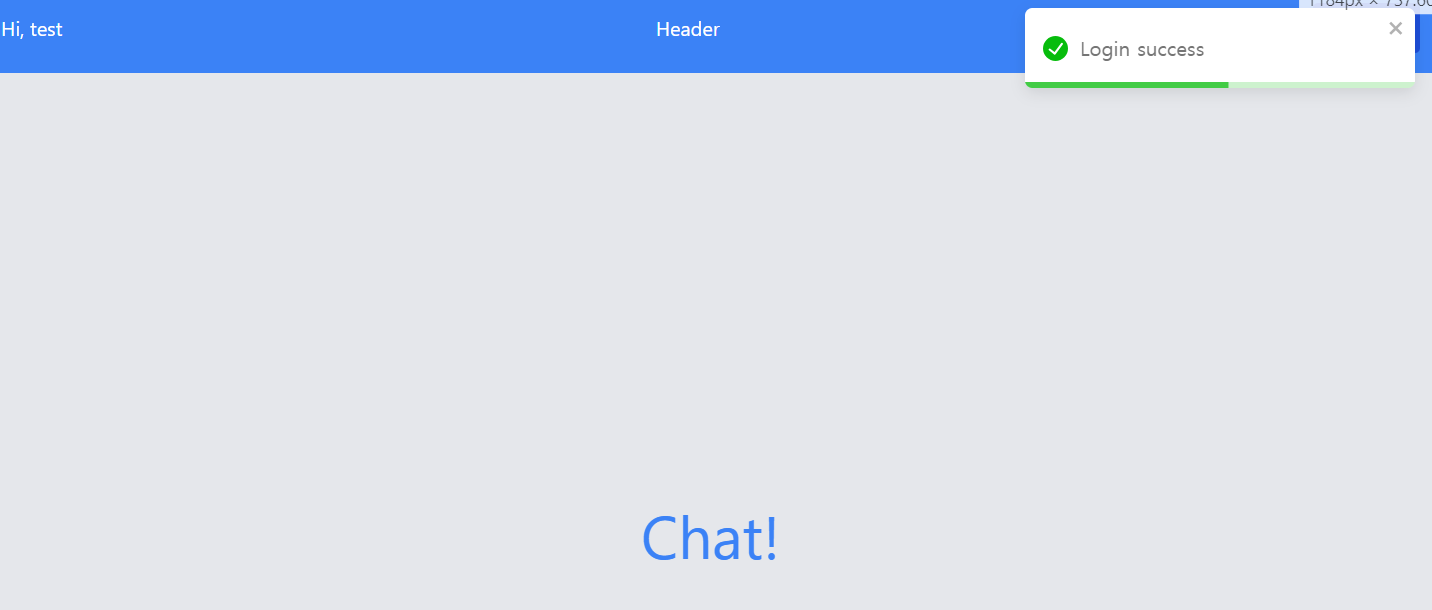
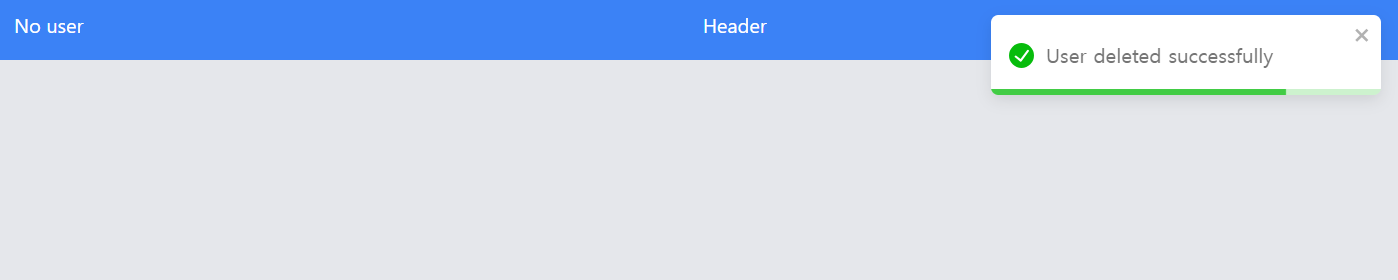
이미지


(로그인) 


(유저 삭제)


(로그아웃)

토큰 제거


'IT > Backend' 카테고리의 다른 글

[BE] Socket io로 통신하기  (1) 2024.02.12

지난 앱 배포하기 과정에서 내부 테스트를 진행 해주고 즉각 결과가 나왔고,
지적된 문제점을 개선해주었다.


내부 테스트

- 내부 테스트는 배포 할 앱을 aab 형식 파일로 올려야 한다.

https://velog.io/@dear_sopi9211/react-native-%EC%95%88%EB%93%9C%EB%A1%9C%EC%9D%B4%EB%93%9C-APKAAB-%ED%8C%8C%EC%9D%BC-%EC%83%9D%EC%84%B1%ED%95%98%EA%B8%B0

cd android
./gradlew bundleRelease


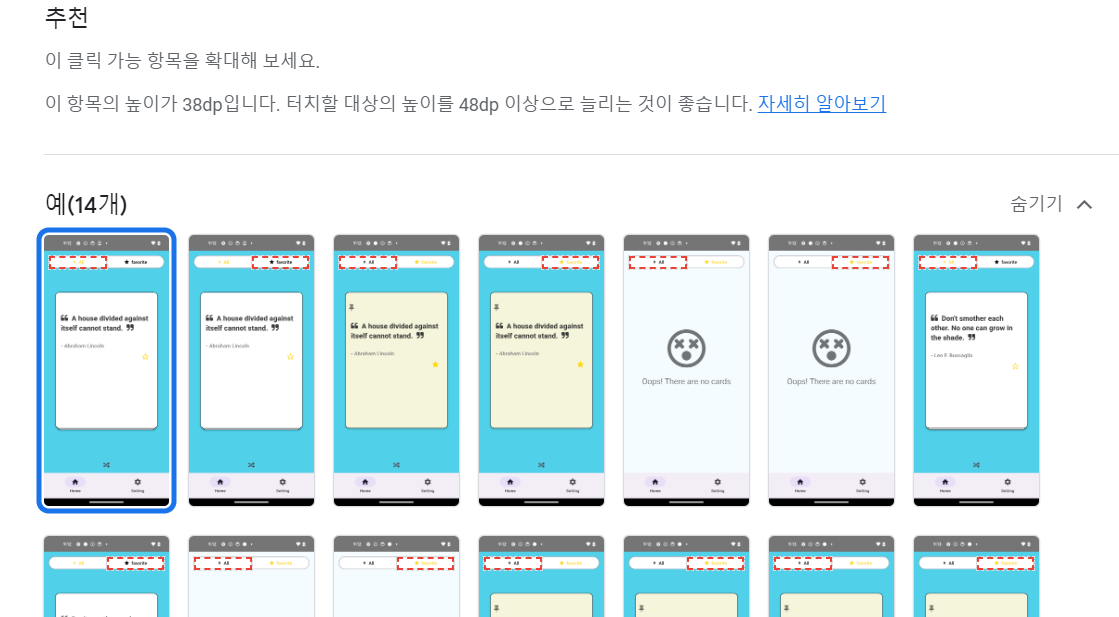
- 터치 버튼 권장 사이즈가 48dp 여서 적절한 사이즈로 늘려주었고,

- React native Paper의 세그먼트 버튼은 자체적인 사이즈를 바꿀 순 없기에, react native segmented control로 변경 해주었다.

- 그래서, 버튼 디자인이 약간 수정되었다.

https://github.com/react-native-segmented-control/segmented-control


- 나머지, 사소한 문제에 해당되는 것은 라벨을 지정하지 않은 것과,

색상 대비를 높이라는 문제였다.


테스트 성능 향상


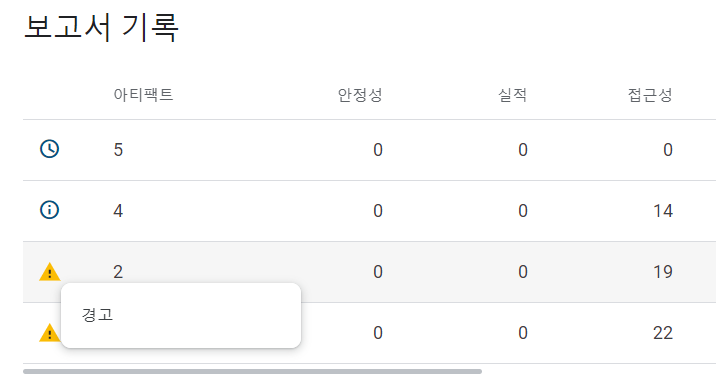
- 결론: (경고수준의 22개의 문제 → 사소한 수준의 14개의 문제, 36.36% 개선)


비공개 테스트 관련


https://support.google.com/googleplay/android-developer/answer/14151465#overview


이번에 구글 스토어 배포 정책이 변경되었다.


원래 이렇게까지 까다롭진 않았는데, 최종 스토어에 배포를 하려면 
20명 이상의 테스터와 그들이 또, 하루 5분 이상 14일 이상을 내 앱으로 테스트를 해야 내부 테스트 통과가 된다...

(찾아보니까 이것을 돈 주고 대행 할 수 있는 사이트도 있었다.)


그 정도의 사람과 부탁을 하기엔 너무 힘들거 같아서 아쉽지만 내부 테스트까지 완료하걸로 만족해야겠다.

노션이 너무 편해서 노션에만 기록을 하고 있지만,
프로젝트를 마무리 하면서 간만에 작성해본다.


-플젝 느낀 점-

1. expo-> react native cli로 많이들 가는 데 이유를 알게 되었다.

2. 프로젝트를 하기 전 심도있는 설계 과정의 중요성.

3. 이제 expo는 안 쓸듯( 많은 오류, bare RN 보다 유연하지 못함, 상대적으로 정보 부족)


프로젝트 목적

처음으로 구글 플레이 스토어에 배포, bare RN 사용 목적으로 만든 간단한 명언 앱이다.

그래서 그런지 개발 기간도 약 일주일이다.

해당 라이브러리는 데이터를 가져오는 것도 아니라 Rest api 를 구현 해줄 필요도 없다.

이미 설치 시점부터 명언 데이터가 들어가있다.


기술 스택

  • Redux Persist, Redux Tool Kit, React Native, TypeScript


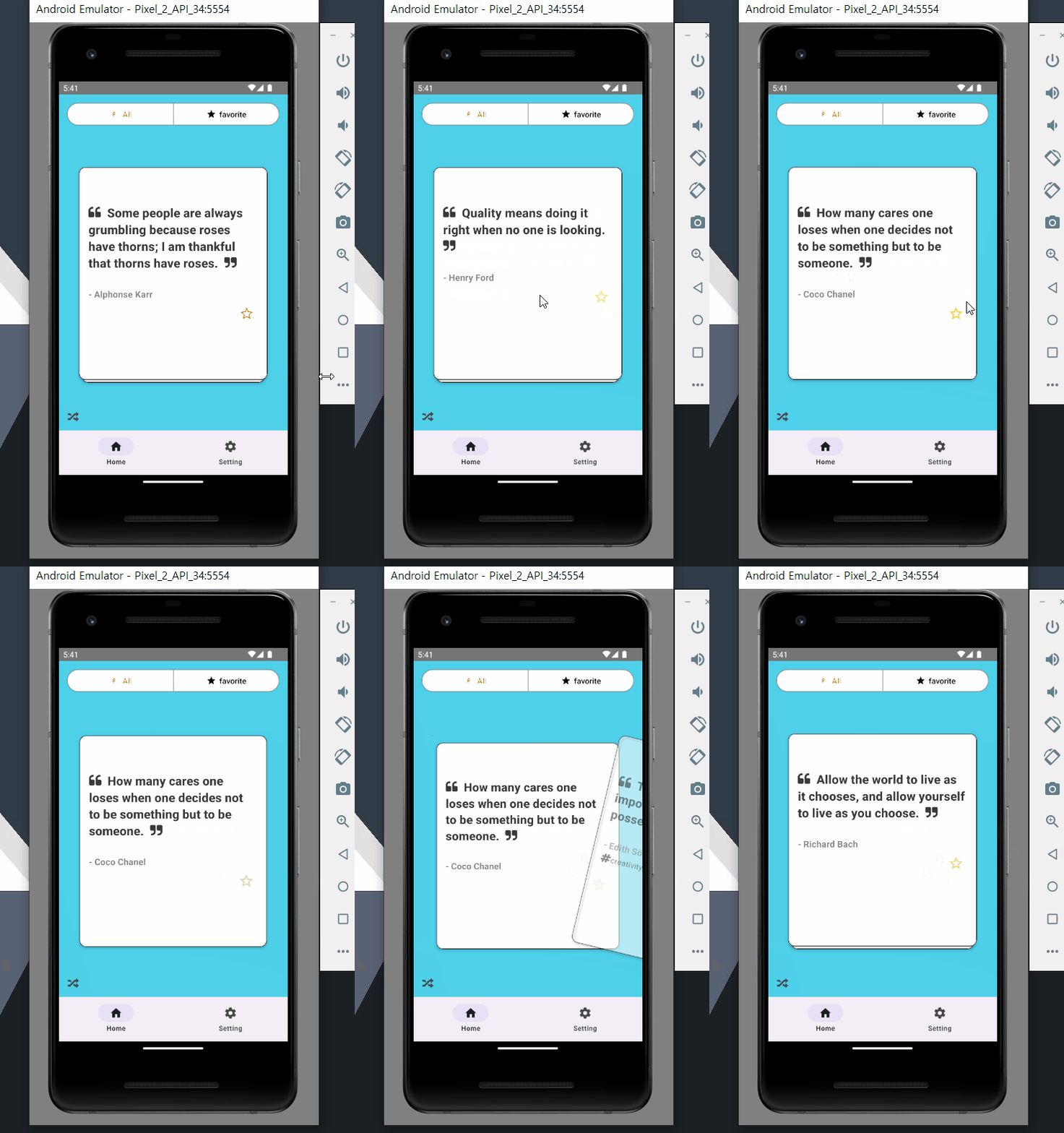
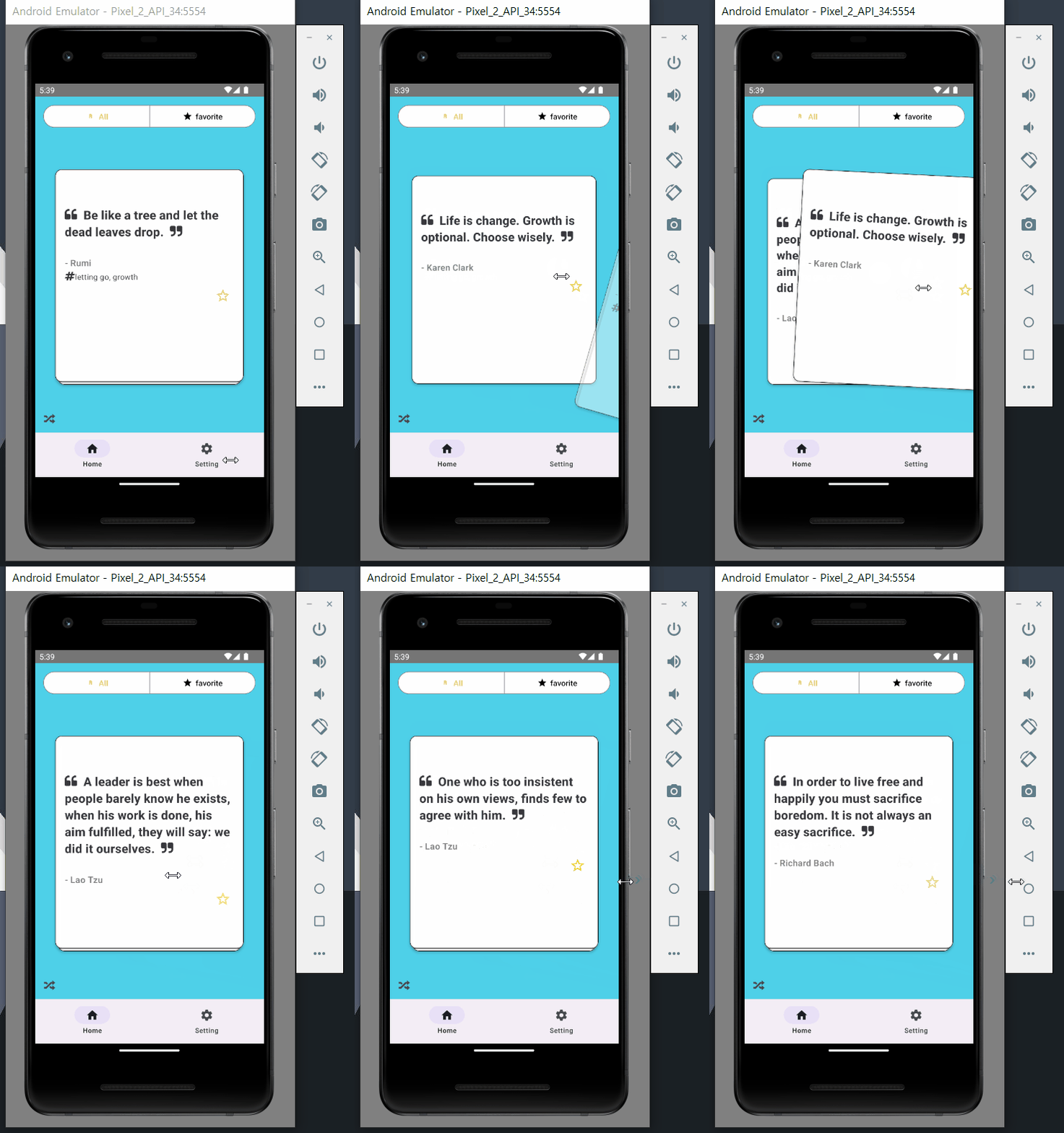
미리보기


설계

  • 전체 카드 목록, 즐겨 찾기 목록 구성 ->  https://github.com/dwyl/quotes 에서 가져온 명언 사용,
    즐겨찾기, 전체 카드 최소 두 개의 리듀서가 필요.
  • 앱을 종료 후 들어와도 즐겨 찾기 목록이 사라지면 안됨. -> Redux Persist , (Storage: Async Storage)


네비게이션(하단 탭) 구현


Material bottom tab 으로 하단 탭을 구성해줬다. 깔끔한 디자인으로 하단탭을 구성 가능하다.

해당 기능은 React native paper로 이동됐다.

텍스트나 아이콘도 Paper을 사용할 거라 겹치는게 많다.


const TabNavigator = (props: Props) => {
  return (
    <Tab.Navigator>
      <Tab.Screen
        name="Home"
        component={HomeScreen}
        options={{tabBarIcon: 'home'}}
      />
      <Tab.Screen
        name="Setting"
        component={SettingScreen}
        options={{tabBarIcon: 'cog'}}
      />
    </Tab.Navigator>
  );
};


React Paper 이용할 때, 유의점


문제점)

앱에 빌드해서 실제 안드로이드 기기에서 실행할 때,
Theme, Style이 적용이 안 돼있어서 에뮬에서 실행해본 디자인과는 상이하게 나타난다

(텍스트나 아이콘이 엄청 연하고 밝게 나타남)


해결)

1. android   >  ,,,, > values>styles.xml   ->  .Light. 로 변경

  <!-- Base application theme. -->
    <style name="AppTheme" parent="Theme.AppCompat.Light.NoActionBar">


2.  theme 적용 해주기


  import {DefaultTheme, Provider as PaperProvider} from 'react-native-paper';
  
  const theme = {
    ...DefaultTheme,
    colors: {
      ...DefaultTheme.colors,
      primary: 'tomato',
      secondary: 'yellow',
    },
  };

  return (
        <PaperProvider theme={theme}>
        </PaperProvider>


카드 사라짐 오류


문제점) 즐겨찾기 카드를 없앨 때, 현재 인덱스를 가르키지 않아서 빈 화면이 뜸.


해결) 

// FavoriteCardDeck.tsx

const onPressStar = (quote: Quote) => {
    dispatch(removeQuote(quote));
    dispatch(removeStar(quote));

    const curCardIndex = (swiperRef.current?.state as any)?.firstCardIndex;
    // 현재 보는 카드의 인덱스가 0이 아니고,
    // 뒤에 카드가 없을때, 인덱스 -1 로 위치 변경
    if (curCardIndex !== 0 && curCardIndex === favoriteQuotes.length - 1) {
      swiperRef.current?.jumpToCardIndex(curCardIndex - 1);
    }
  };

- 쓰고 있는 라이브러리에선 아쉽게도 ref.current를 통해서만 현재 인덱스를 불러오고, 그 인덱스를 갈 수 있다.

- 카드 클릭시 현재 카드를 줄이고, 인덱스가 0이 아닌이상 -1 만큼 이동하게끔 했다.


카드 떨림 오류 해결


문제점) 카드를 넘기다 보면 랜더링 될 때, 카드가 상단으로 살짝 올라갔다 내려오는 현상이 발생.


- 디바이스 현재 가로 세로 길이를 추적하는 코드가 카드가 컴포넌트 될 때마다 실행됨.

useEffect(() => {
    setIsPotrait(isPortraitNow(width, height));
  }, [width, height]);


해결)


// 불필요한 계산을 줄이기 위해
  useMemo(() => {
    setIsPotrait(isPortraitNow(width, height));
  }, [width, height]);

-  useMemo로 값을 메모이제이션 하고, 불필요하게 함수를 재 실행하지 않고,

저장된 값을 토대로 값이 변해야 함수를 계산 시킴.

- 성능 최적화.


ESLint 설정

module.exports = {
  root: true,
  extends: '@react-native',
  rules: {
    'react/react-in-jsx-scope': 'off',
    'react-native/no-inline-styles': 'off',
    'prettier/prettier': [
      'error',
      {
        endOfLine: 'auto',
      },
    ],
    'react/no-unstable-nested-components': ['error', {allowAsProps: true}],
    'no-unused-vars': 'off',
    '@typescript-eslint/no-unused-vars': 'off',
  },
  plugins: ['react', '@typescript-eslint'],
  env: {
    browser: true,
    es2021: true,
  },
};


- 코드를 작성할 때, 권장하는 설정에서 주의 관련 거슬리는 밑줄이 뜨는데, 이를 막아준다.


Redux Persist 구성


  • 스토어 구성
const persistConfig = {
  storage: AsyncStorage,
  key: 'root',
};
const rootReducer = combineReducers({
  allQuotesReducer,
  favoriteReducer,
  settingSliceReducer,
});

export const persistedReducer = persistReducer(persistConfig, rootReducer);
export const store = configureStore({
  reducer: persistedReducer,
  middleware: getDefaultMiddleware =>
    getDefaultMiddleware({
      serializableCheck: {
        ignoredActions: [FLUSH, REHYDRATE, PAUSE, PERSIST, PURGE, REGISTER],
        warnAfter: 128, // or any other value
      },
      immutableCheck: {warnAfter: 128},
    }),
});
export const persistor = persistStore(store);
export type RootState = ReturnType<typeof rootReducer>;


- MiddleWare 설정을 하므로써, redux-persist와 함께 사용될 때의 serialization 및 immutability 관련 이슈를 피할 수 있다.


  • 스토어 구독
 // App.tsx
 <ReduxProvider store={store}>
      <PersistGate persistor={persistor} loading={null}>


  • 슬라이스 구성
import {PayloadAction, createSlice} from '@reduxjs/toolkit';
import {Quote, parse_json} from 'quotesy';
import {shuffleArray} from '../../utils/shuffleArrayUtil';

const initialState: Quote[] = parse_json();

const allQuotesSlice = createSlice({
  name: 'all_quotes',
  initialState,
  reducers: {
    shuffleAllQuotes: state => {
      const shuffledQuotes = shuffleArray(state);
      return shuffledQuotes;
    },
    changeLike: (state, action: PayloadAction<string>) => {
      return state.map(quote =>
        quote.text === action.payload
          ? {...quote, favorite: !quote.favorite}
          : quote,
      );
    },
    removeStar: (state, action: PayloadAction<Quote>) => {
      const {text} = action.payload;
      return state.map(quote =>
        quote.text === text ? {...quote, favorite: false} : quote,
      );
    },
    removeAllStar: state => {
      return state.map(quote => ({...quote, favorite: false}));
    },

  },
});

export const {
  shuffleAllQuotes,
  changeLike,
  removeStar,
  removeAllStar,
} = allQuotesSlice.actions;
export const allQuotesReducer = allQuotesSlice.reducer;


  • 사용
 const quotes = useSelector((state: RootState) => state.allQuotesReducer);


  • 즐겨찾기 해제, 등록 관련 함수
const onPressStar = (quote: Quote) => {
    const {favorite} = quote;

    if (favorite === false || favorite === undefined) {
      dispatch(changeLike(quote.text));
      dispatch(addQuote(quote));
    } else if (favorite === true) {
      dispatch(removeQuote(quote));
      dispatch(removeStar(quote));
    }
  };


카드 슬라이더 구성


return (
    <SafeAreaView style={styles.container}>
      {favoriteQuotes.length > 0 ? (
        <Swiper
          stackAnimationFriction={5}
          infinite
          goBackToPreviousCardOnSwipeLeft
          goBackToPreviousCardOnSwipeTop
          cards={favoriteQuotes}
          animateCardOpacity
          // 최대 스택 크기 5
          stackSize={favoriteQuotes.length > 5 ? 5 : favoriteQuotes.length}
          ref={swiperRef}
          cardIndex={0}
          // 카드가 한 개뿐이면 움직면 멈추기
          disableRightSwipe={cardLength > 1 ? false : true}
          disableLeftSwipe={cardLength > 1 ? false : true}
          disableBottomSwipe={cardLength > 1 ? false : true}
          disableTopSwipe={cardLength > 1 ? false : true}
          renderCard={(card: Quote, cardIndex: number) => {
            return (
              <QuoteCard
                quote={card}
                cardIndex={cardIndex}
                onPressStar={onPressStar}
              />
            );
          }}
        />
      ) : (
        <EmptyCard />
      )}

      {cardLength > 0 && <ShuffleButton />}
    </SafeAreaView>
  );
};
  const favoriteQuotes = useSelector(
    (state: RootState) => state.favoriteReducer,
  );


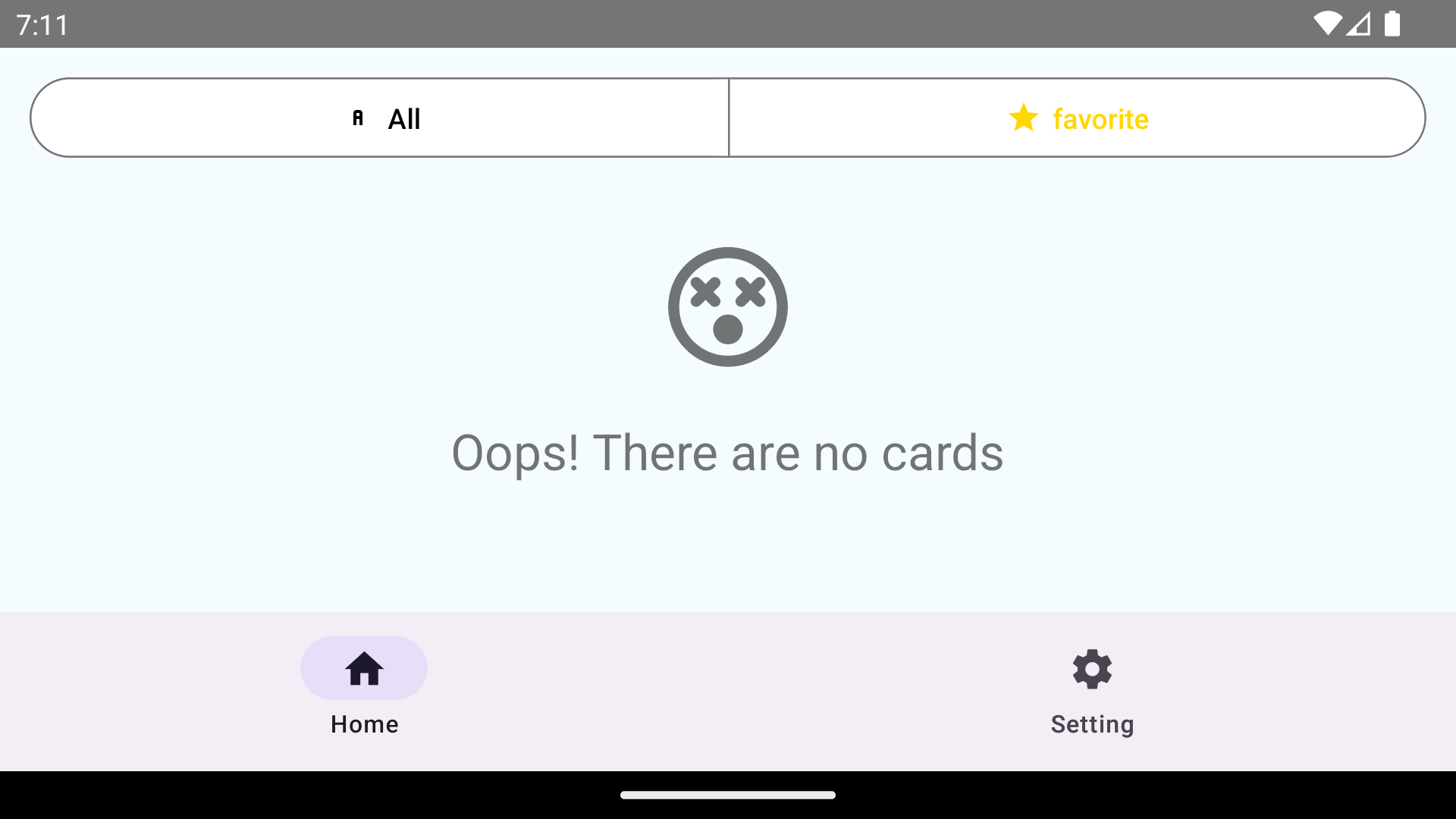
- favorite 리듀서에서 저장된 값을 가져와 값이 있으면 Swiper에 Quote[] 배열을 보내고
없으면, Empty 카드 컴포넌트 를 띄움.


- 참 편리한 라이브러리다, 무한 스와이핑, 기본 애니메이션, 카드 쌓임 효과 유무 등을
설정할 수가 있다.


https://www.npmjs.com/package/react-native-deck-swiper


배포


구글 스토어에 앱을 등록하려면 귀찮은 것들이 꽤 많다 (화면에 따른 썸네일) (과정 생략...)

일단, 개발자 계정을 만들어 주고(등록비 약 33,000원), 앱에 대해 여러 설문도 하고

이용 약관도 만들어준다..

우여곡절 끝에 aab(Android App Bundle) 로 생성된 자신의 앱을 스토어에 등록하면,


검수를 기다리면 된다. (ㄷㄱㄷㄱ)


마치며


- 사소한 문제와 하고 싶은 기능이 많았지만,  ' 앱 배포, bare react native 사용해보기 ' 가 

현재 프로젝트의 목적이었기에 시간이 걸리거나 지체되는 것들은 과감히 넘어갔다.


- 물론, 오류가 떠서 앱이 실행되지 않는 심각한 문제들은 시간이 걸리더라도 해결 해줬다.

미리보기

📦company
 ┣ 📜index.php
 ┣ 📜memberAdd.php
 ┣ 📜memberDel.php
 ┣ 📜memberDelAll.php
 ┣ 📜memberEdit.php
 ┣ 📜memberList.php
 ┗ 📜sqlLib.php


index.php

<body>
    <!-- 멤버 리스트를 DB에서 가져옴 -->
    <? include "memberList.php" ?>

    <!-- 멤버 리스트 작성폼 -->
    <h2 class="mb-5 mt-5">-입력폼-</h2>
    <form action="memberAdd.php" method="post" class="mt-5">

        <table class="table" border="1">
            <tr>
                <td>
                    이름
                </td>
                <td>
                    나이
                </td>
                <td>
                    이메일
                </td>
                <td>
                    한마디
                </td>

            </tr>
            <tr>
                <td>
                    <input placeholder="이름" type="text" name="name"></input>
                </td>
                <td>
                    <input placeholder="나이" type="text" name="age"></input>
                </td>
                <td>
                    <input placeholder="이메일" type="text" name="email"></input>
                </td>
                <td>
                    <input placeholder="한마디" type="text" name="word"></input>
                </td>

            </tr>
        </table>
        <button type="submit" class="btn btn-primary text-right">제출하기</button>
        <button type="button" class="btn btn-danger text-right" onclick="confirmDelete()">전체삭제</button>

    </form>


- 기본 입력폼 형태와 테이블 리스트를 불러옵니다.

- 테이블과 버튼들을 연결해줍니다.


Create

<?
include "sqlLib.php";

$name = $_POST['name'];
$age = $_POST['age'];
$email = $_POST['email'];
$word = $_POST['word'];

// MySQL 쿼리를 안전하게 만드는 데 중요한 역할

$name = mysqli_real_escape_string($connect, $name);
$age = mysqli_real_escape_string($connect, $age);
$email = mysqli_real_escape_string($connect, $email);
$word = mysqli_real_escape_string($connect, $word);


$query = "insert into member(name,age,email,word) values('$name','$age','$email','$word')";


mysqli_query($connect, $query);

?>
<script>
    location.href = 'index.php';
</script>


- index.php에서 받아온 데이터들을 해당 테이블에 삽입 시켜줍니다.


Read

<?
include "sqlLib.php";

$query = "select * from member";

$result = mysqli_query($connect, $query);

?>

<h2 class="mb-3">-멤버 리스트-</h2>
<div class="p-3"></div>
<table class="table" border="1" >
    <thead>
        <tr >
            <td>NO.</td>
            <td>이름</td>
            <td>나이</td>
            <td>이메일</td>
            <td>한마디</td>
            <td>삭제</td>
            <td>수정</td>
        </tr>
    </thead>


    <?
    while ($a = mysqli_fetch_assoc($result)) {
        $id = $a['id'];
        $name = $a['name'];
        $age = $a['age'];
        $email = $a['email'];
        $word = $a['word'];

    ?>
    
        <tr>
            <td><?= $id ?></td>
            <td><?= $name ?></td>
            <td><?= $age ?></td>
            <td><?= $email ?></td>
            <td><?= $word ?></td>
            <td> <a href="memberDel.php?id=<?= $id ?>" onclick="return confirm('정말 삭제할까요?')">삭제</a> </td>
            <td> <a href="#" onclick="onEdit('<?= $id ?>');">수정</a> </td>

        </tr>

    <? } ?>


</table>


- select쿼리문을 실행시켜 해당 테이블의 열을    mysqli_fetch_assoc($result) 을 통해서

행을 한 줄씩 가져옵니다.

- 가져온 행을 하나씩 대입 시켜줍니다.


Update

    <!-- memberList.php --!>
    
    <td> <a href="#" onclick="onEdit('<?= $id ?>');">수정</a> </td>
    
    <script>
    function onEdit(id) {
        const word = prompt('수정할 내용을 적으시오');
        location.href = 'memberEdit.php?id=' + id + "&word=" + word;

    }
</script>


- <a>태그를 누르면 수정할거 냐는 프롬프트 구문이 나오고 그것에 응할시,

수정관련 파일로 id, word 데이터와 함께 페이지 이동시켜줍니다.


<?
include 'sqlLib.php';

$id = $_GET['id'];
$word = $_GET['word'];

$query = "update member set word='$word' where id='$id' ";

mysqli_query($connect, $query);

?>
<script>
    location.href = 'index.php';
</script>


- 수정 작업 파일에선 받아온 데이터를 수정할 쿼리문에 적용시킨 후 실행하고,

다시 본문으로 돌아가 줍니다.


Delete

 <!--memberList.php -->
 
 <td> <a href="memberDel.php?id=<?= $id ?>" onclick="return confirm('정말 삭제할까요?')">삭제</a> </td>
 

 <?
 // memberDel.php
 
include 'sqlLib.php';

$id = $_GET['id'];

$query = "delete from member where id= '$id'";

mysqli_query($connect, $query);

?>


<script>
    location.href = "index.php";
</script>


- update 부문하고 비슷하게 삭제 확인을 승락하면 아이디가 memberDel.php로

보내지고 쿼리문이 실행되고 다시 본문으로 되돌아가 줍니다.


전체 삭제


  <!-- memberList.php --!>
  <button type="button" class="btn btn-danger text-right" onclick="confirmDelete()">전체삭제</button>


  <script>
        function confirmDelete() {
            const doIt = confirm('정말 전체 삭제할까요?');
            if (doIt) {
                // 확인을 누르면 서버에 요청을 보내서 삭제 작업을 수행
                deleteAll();
            } else {
                // 취소를 누르면 아무 작업도 하지 않음
                return;
            }
        }

        function deleteAll() {
            // JavaScript를 사용하여 서버에 AJAX 요청을 보냄
            var xhr = new XMLHttpRequest();
            xhr.open("POST", "memberDelAll.php", true);
            xhr.onreadystatechange = function() {
                if (xhr.readyState == 4 && xhr.status == 200) {
                    // 서버의 응답에 대한 처리 (optional)
                    console.log(xhr.responseText);
                    window.location.reload();
                }
            };
            xhr.send();
        }
    </script>

- 전체삭제에서는 비동기 구문을 사용했습니다.

JavaScript에서 AJAX(Asynchronous JavaScript and XML)를 사용하여 비동기적으로 서버에 데이터를 요청하고 응답을 처리하는 예제입니다.

페이지 전체를 새로고침하지 않고도 서버와 통신하여 데이터를 가져오거나 전송할 수 있습니다.

- var xhr = new XMLHttpRequest();: XMLHttpRequest 객체를 생성합니다. 이 객체를 사용하여 서버와 상호 작용할 수 있습니다.

- xhr.open("POST", "memberDelAll.php", true);: XMLHttpRequest 객체를 초기화합니다. "POST"는 데이터를 서버로 전송할 때 사용되는 HTTP 메서드입니다. 두 번째 매개변수는 요청을 보낼 URL이고, 세 번째 매개변수 true는 비동기적으로 요청을 처리하도록 지정합니다.

- xhr.onreadystatechange = function () {...}: onreadystatechange 이벤트 핸들러를 정의합니다. 이 이벤트는 서버로부터 응답이 도착할 때마다 발생합니다. 응답의 상태가 변경될 때마다 이 함수가 호출됩니다.

if (xhr.readyState == 4 && xhr.status == 200) {...}: readyState가 4이고 status가 200인 경우에만 코드 블록이 실행됩니다. readyState가 4는 서버 응답이 완료되었음을 나타내고, status가 200은 성공적인 응답임을 나타냅니다.

-console.log(xhr.responseText);: 서버의 응답 내용을 콘솔에 출력합니다. 이 부분은 디버깅을 위한 것으로, 실제 애플리케이션에서는 필요에 따라 다른 작업을 수행할 수 있습니다.

-window.location.reload();: 페이지를 새로고침하여 변경 사항을 적용합니다. 새로고침 없이도 페이지의 일부를 업데이트할 수 있지만, 여기서는 삭제 작업이 완료된 후에 페이지를 전체적으로 새로고침하도록 했습니다.

'IT > PHP & MySQL' 카테고리의 다른 글

[PHP&MySQL] xampp - mysql 실행 불가 [solved]  (0) 2023.11.13
[PHP&MySQL] phpMyadmin 다뤄보기  (0) 2023.11.13

무한 오류 발생

증상) xampp에서 mysql을 start 계속 눌러도 얼마 안 있다 꺼지고,
다시 켜도 꺼지고 반복됐다.


해결

xampp>mysql>backup에 있는 파일들

모두 xampp>mysql>data에 덮어쓰기 후 해결됐다!

'IT > PHP & MySQL' 카테고리의 다른 글

[PHP & MySQL] 그룹 멤버 리스트 CRUD 구현  (0) 2023.11.15
[PHP&MySQL] phpMyadmin 다뤄보기  (0) 2023.11.13

+ Recent posts